C++ CS106L
Overview
以下内容来自Stanford CS106L https://web.stanford.edu/class/cs106l/lectures/
Design Philosophy of C++
- Only add features if they solve an actual problem
- Programmers should be free to choose their own style
- Compartmentalization is key
- Allow the programmer full control if they want it
- Don’t sacrifice performance except as a last resort
- Enforce safety at compile time whenever possible
C++ is a statically typed language statically typed: everything with a name (variables, functions, etc) is given a type before runtime
dynamically typed: everything with a name (variables, functions, etc) is given a type at runtime based on the thing’s current value
Compiled vs Interpreted
Main Difference: When is source code translated?
Runtime: Period when program is executing commands (after compilation, if compiled)
static typing helps us to prevent errors before our code runs
Overloading Define two functions with the same name but different types
struct: a group of named variables each with their own type. A way to bundle different types together
std::pair: An STL built-in struct with two fields of any type To avoid specifying the types of a pair, use std::make_pair(field1, field2)
// Use std::pair to return success + result
std::pair<bool, Student> lookupStudent(string name) {
 Student blank;
 if (notFound(name)) return std::make_pair(false, blank);
 Student result = getStudentWithName(name);
 return std::make_pair(true, result);
}
 std::pair<bool, Student> output = lookupStudent(“Julie”);
auto: Keyword used in lieu of type when declaring a variable, tells the compiler to deduce the type.
Don’t overuse auto
…but use it to reduce long type names
Initialization
Initialization: How we provide initial values to variables
std::pair<int, string> numSuffix1 = {1,"st"};
std::pair<int, string> numSuffix2;
numSuffix2.first = 2;
numSuffix2.second = "nd";

std::pair<int, string> numSuffix2 =
                      std::make_pair(3, "rd");
Uniform initialization: curly bracket initialization. Available for all types, immediate initialization on declaration! TLDR: use uniform initialization to initialize every field of your non-primitive typed variables - but be careful not to use vec(n, k)!
std::vector<int> vec{1,3,5};
std::pair<int, string> numSuffix1{1,"st"};

Student s{"Sarah", "CA", 21};
// less common/nice for primitive types, but possible!

int x{5};
string f{"Sarah"};

// Careful with Vector initialization!
std::vector<int> vec1(3,5);
// makes {5, 5, 5}, not {3, 5}!
// uses a std::initializer_list (more later)
std::vector<int> vec2{3,5};
// makes {3, 5}
Structured binding lets you initialize directly from the contents of a struct
auto p = std::make_pair(“s”, 5);
auto [a, b] = p;
// a is string, b is int
// auto [a, b] = std::make_pair(...);
Reference
Reference: An alias (another name) for a named variable “=” automatically makes a copy! Must use & to avoid this
void shift(vector<std::pair<int, int>>& nums) { for (size_t i = 0; i < nums.size(); ++i) {
auto& [num1, num2] = nums[i];
num1++;
num2++;
} }
void shift(vector<std::pair<int, int>>& nums) { for (auto& [num1, num2]: nums) {
num1++;
num2++; }
}
auto my_nums = {{1, 1}};
shift(my_nums);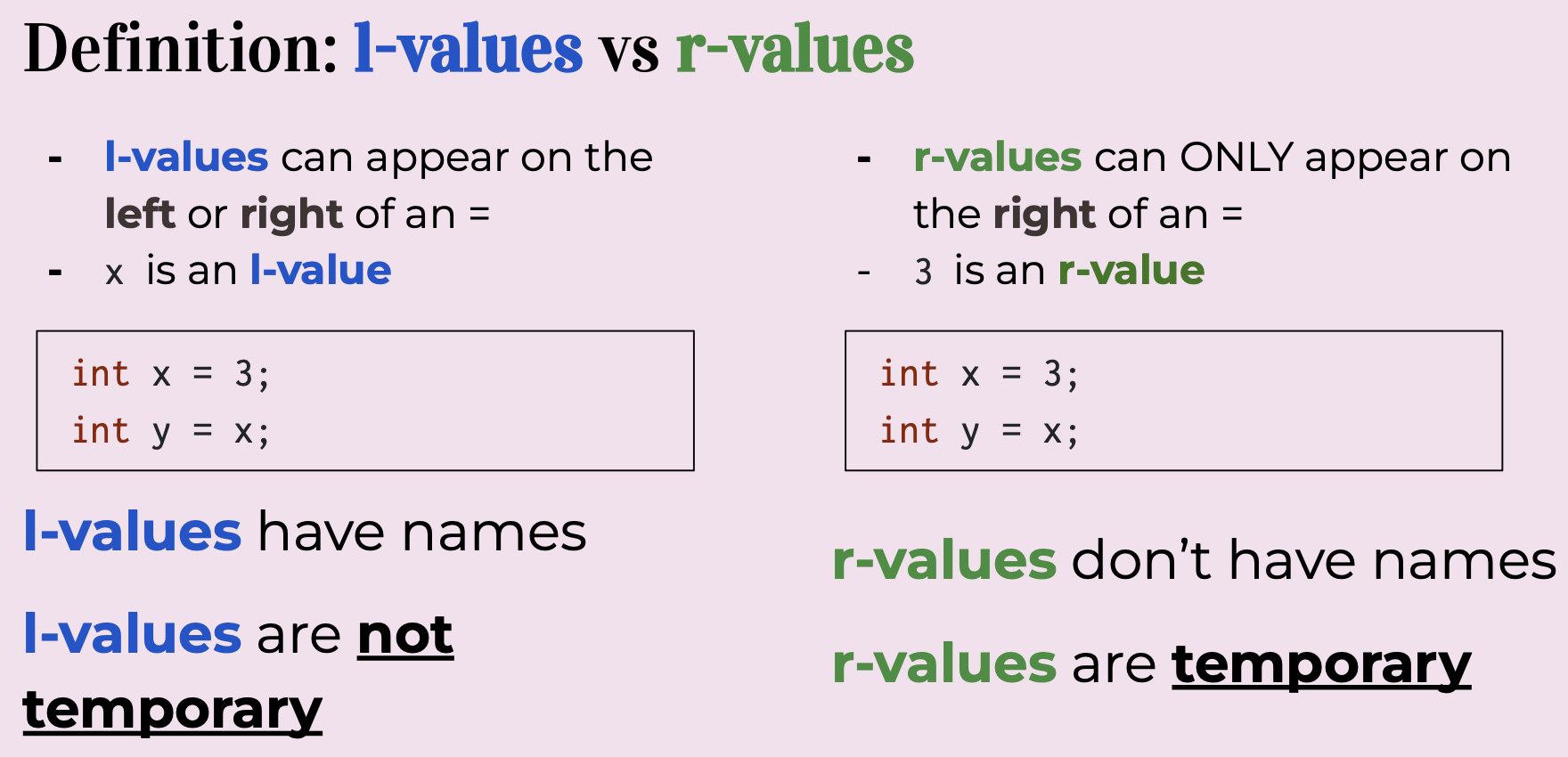 Note: You can only create references to variables (
int& thisWontWork = 5; // This doesn't work!)
const indicates a variable can’t be modified! const variables can be references or not! Can’t declare non-const reference to const variable!
std::vector<int> vec{1, 2, 3};
const std::vector<int> c_vec{7, 8};
std::vector<int>& ref = vec;
const std::vector<int>& c_ref = vec;
auto copy = c_ref;
const auto copy = c_ref;
auto& a_ref = ref;
const auto& c_aref = ref;  // a const reference
Remember: C++, by default, makes copies when we do variable assignment! We need to use & if we need references instead. When do we use references/const references?
- If we’re working with a variable that takes up little space in memory (e.g. int, double), we don’t need to use a reference and can just copy the variable
- If we need to alias the variable to modify it, we can use references
- If we don’t need to modify the variable, but it’s a big variable (e.g. std::vector), we can use const references You can return references as well! Can also return const references
// Note that the parameter must be a non-const reference to return
// a non-const reference to one of its elements!
int& front(std::vector<int>& vec) {
    // assuming vec.size() > 0
    return vec[0];
}
int main() {
    std::vector<int> numbers{1, 2, 3};
    front(numbers) = 4; // vec = {4, 2, 3}
    return 0;
}

const int& front(std::vector<int>& vec) {
    // assuming vec.size() > 0
    return vec[0];
}
Streams
stream: an abstraction for input/output. Streams convert between data and the string representation of data.
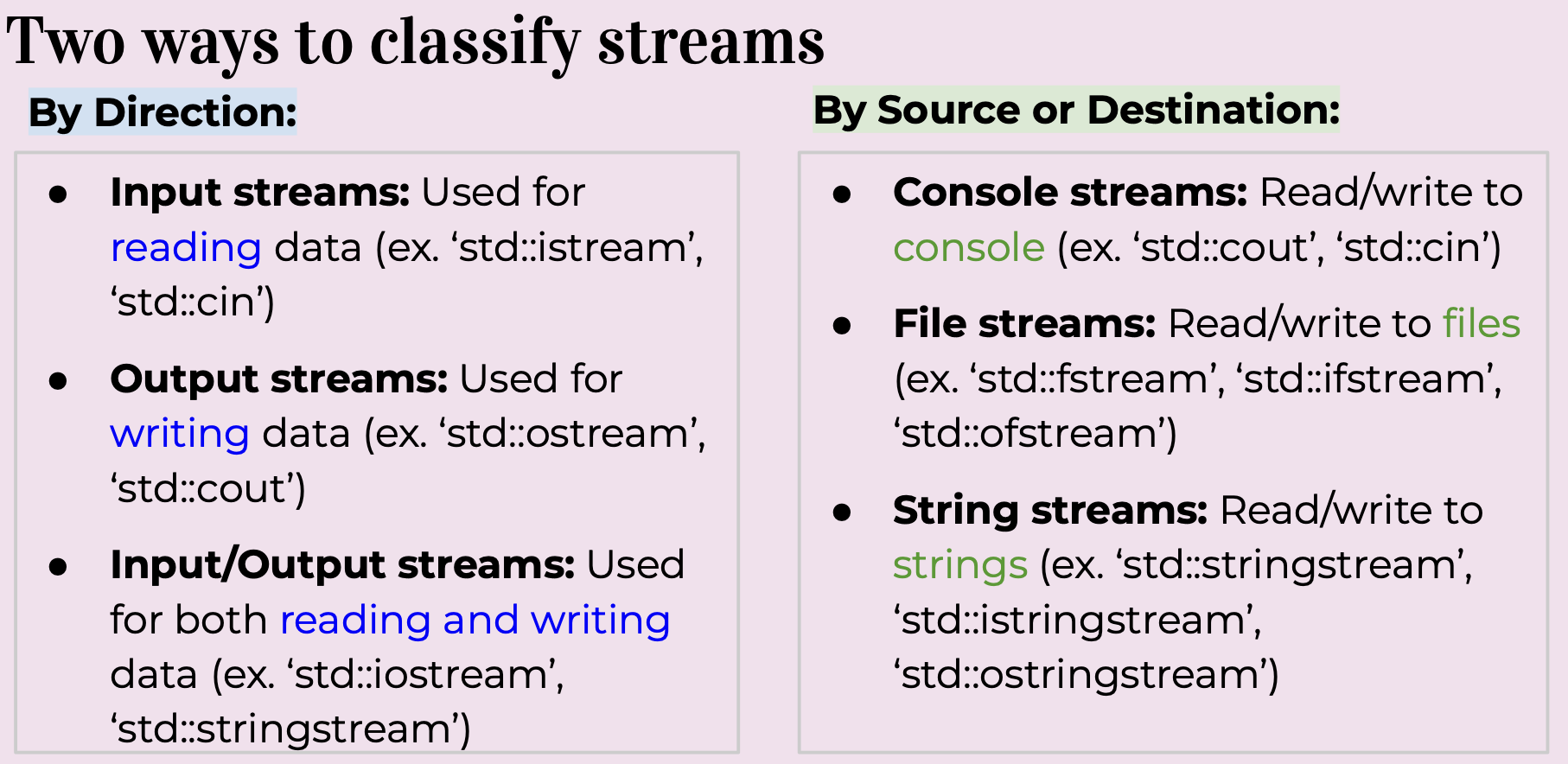 std::cout is an output stream. It has type std::ostream
Output Streams
std::cout is an output stream. It has type std::ostream
Output Streams
- Have type std::ostream
- Can only send data to the stream
- Interact with the stream using the << operator
- Converts any type into string and sends it to the stream
- std::cout is the output stream that goes to the console
- Must initialize your own ofstream object linked to your file
std::cout is a global constant object that you get from
#include <iostream>
std::cout << 5 << std::endl;
// converts int value 5 to string “5”
// sends “5” to the console output stream

std::ofstream out(“out.txt”);
 // out is now an ofstream that outputs to
out.txt
out << 5 << std::endl; // out.txt contains 5
To use any other output stream, you must first initialize it! A note about nomenclature
- “>>” is the stream extraction operator or simply extraction operator
- Used to extract data from a stream and place it into a variable
- “<<” is the stream insertion operator or insertion operator
- Used to insert data into a stream usually to output the data to a file, console, or string std::cin is an input stream. It has type std::istream Input Streams
- Have type std::istream
- Can only receive strings using the >> operator
- Receives a string from the stream and converts it to data
- std::cin is the input stream that gets input from the console Nitty Gritty Details: std::cin
- First call to std::cin >> creates a command line prompt that allows the user to type until they hit enter
- Each >> ONLY reads until the next whitespace
- Whitespace = tab, space, newline
- Everything after the first whitespace gets saved and used the next time is called
- If there is nothing waiting in the buffer, creates a new command line prompt
string str;
int x;
string otherStr;
std::cin >> str >> x >> otherStr;
//what happens if input is blah blah blah?
// str → “blah” x →0 otherStr → NOTHING
std::cout << str << x << otherStr;
//once an error is detected, the input stream’s fail bit is set, and it will no longer accept input
int age; double hourlyWage;
cout << "Please enter your age: ";
cin >> age; // Reads until it finds
something that isn’t an int!
cout << "Please enter your hourly wage: ";
cin >> hourlyWage;
//what happens if first input is 2.17?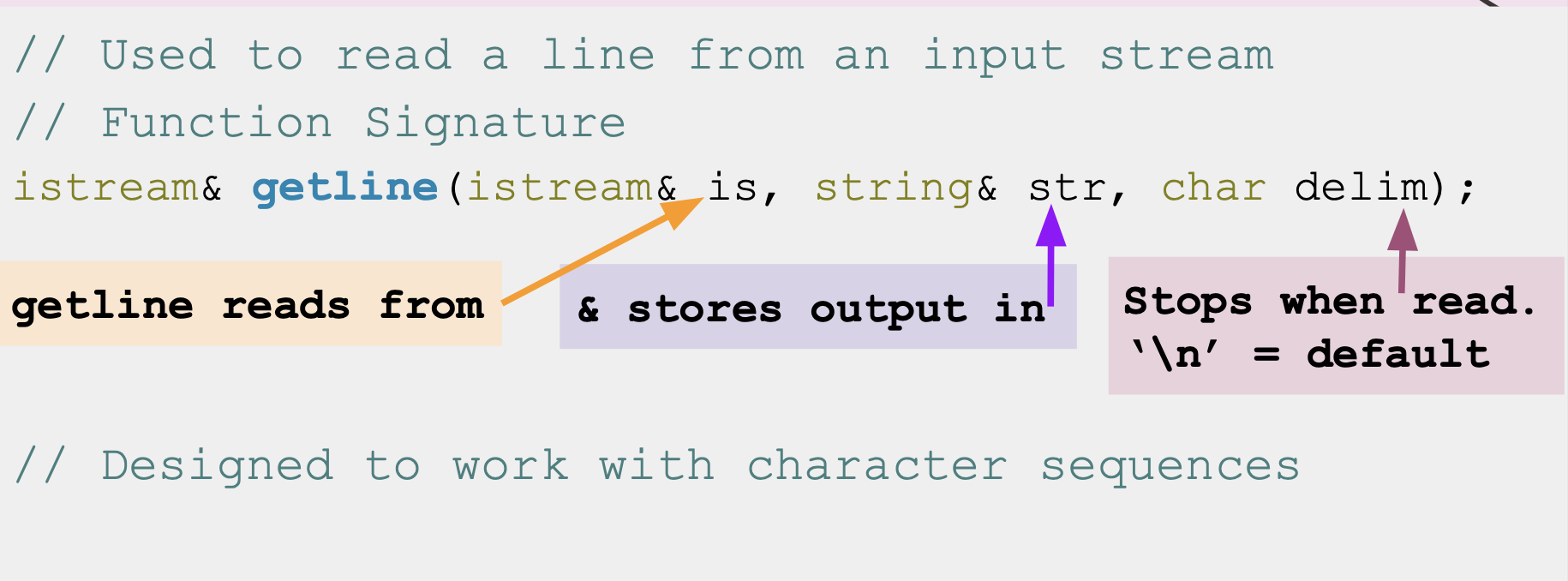 std::getline(istream& is, string& str, char delim)
- How it works:
- Clears contents in str
- Extracts chars from is and stores them in str until:
- End of file reached, sets EOF bit (checked using is.eof())
- Next char in is is delim, extracts but does not store delim
- str out of space, sets FAIL bit (checked using is.fail())
- If no chars extracted for any reason, FAIL bit set In contrast:
- “>>” only reads until it hits whitespace (so can’t read a sentence in one go)
- BUT ”>>” can convert data to built-in types (like ints) while getline can only produce strings.
- AND ”>>” only stops reading at predefined whitespace while getline can stop reading at any delimiter you define
 std::string line;
 std::getline(cin, line); //line changed now!
 //say the user entered “Hello World 42!”
 std::cout << line << std::endl;
 //should print out “Hello World 42!”
Input File Streams
- Have type std::ifstream
- Only receives strings using the >> operator
- Receives strings from a file and converts it to data of any type
- Must initialize your own ifstream object linked to your file
std::cin is a global constant object that you get from
#include <iostream>To use any other input stream, you must first initialize it!
Stringstreams
- What: A stream that can read from or write to a string object
- Purpose: Allows you to perform input/output operations on a string as if it were a stream
std::string input = "123";
std::stringstream stream(input);
int number;
stream >> number;
std::cout << number << std::endl; // Outputs "123"
C++ Design Philosophy
- Only provide the checks/safety nets that are necessary
- The programmer knows best! Making sure what you’re doing is allowed is your job!
Containers
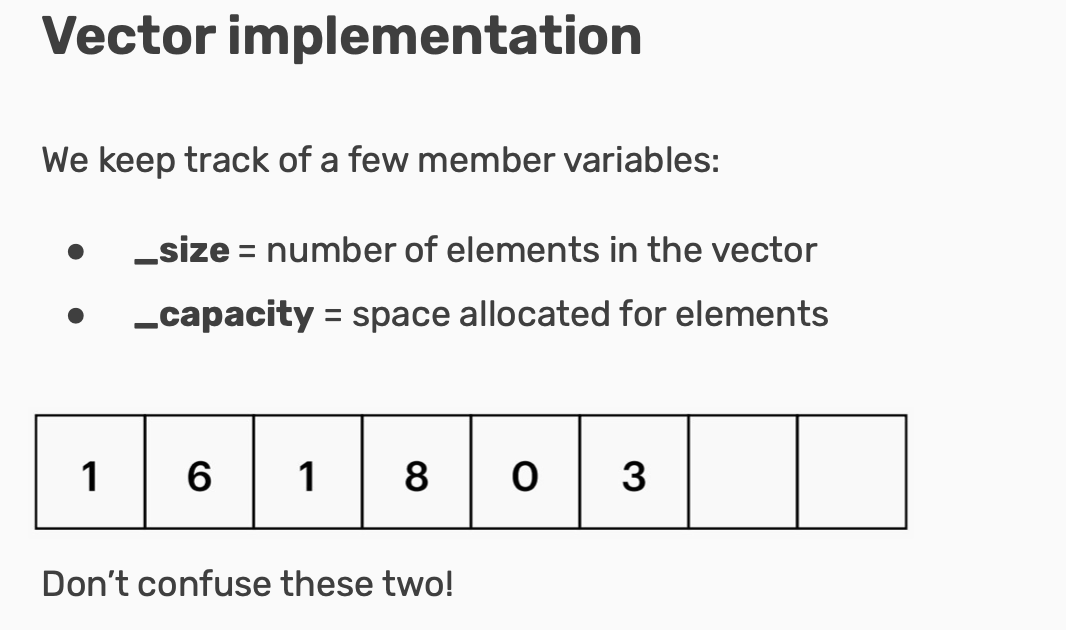
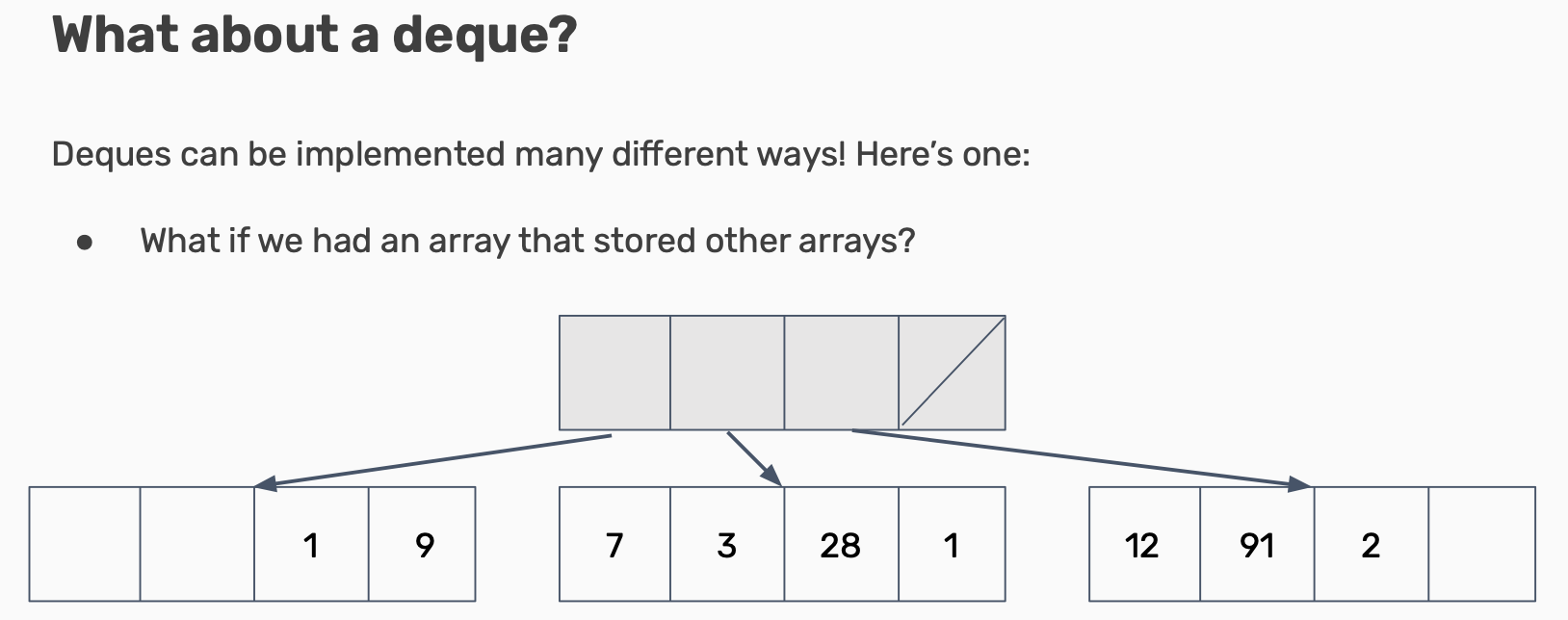
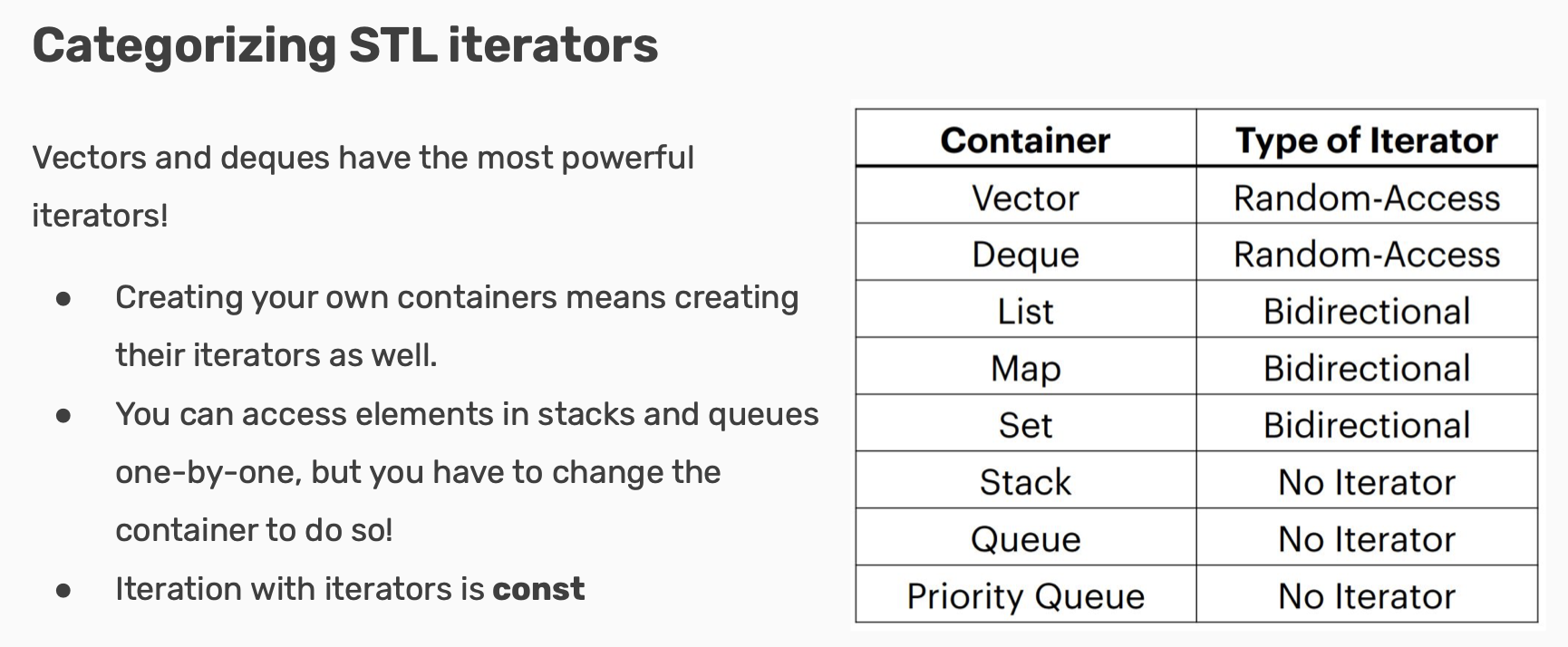 Sequence Containers: Summary
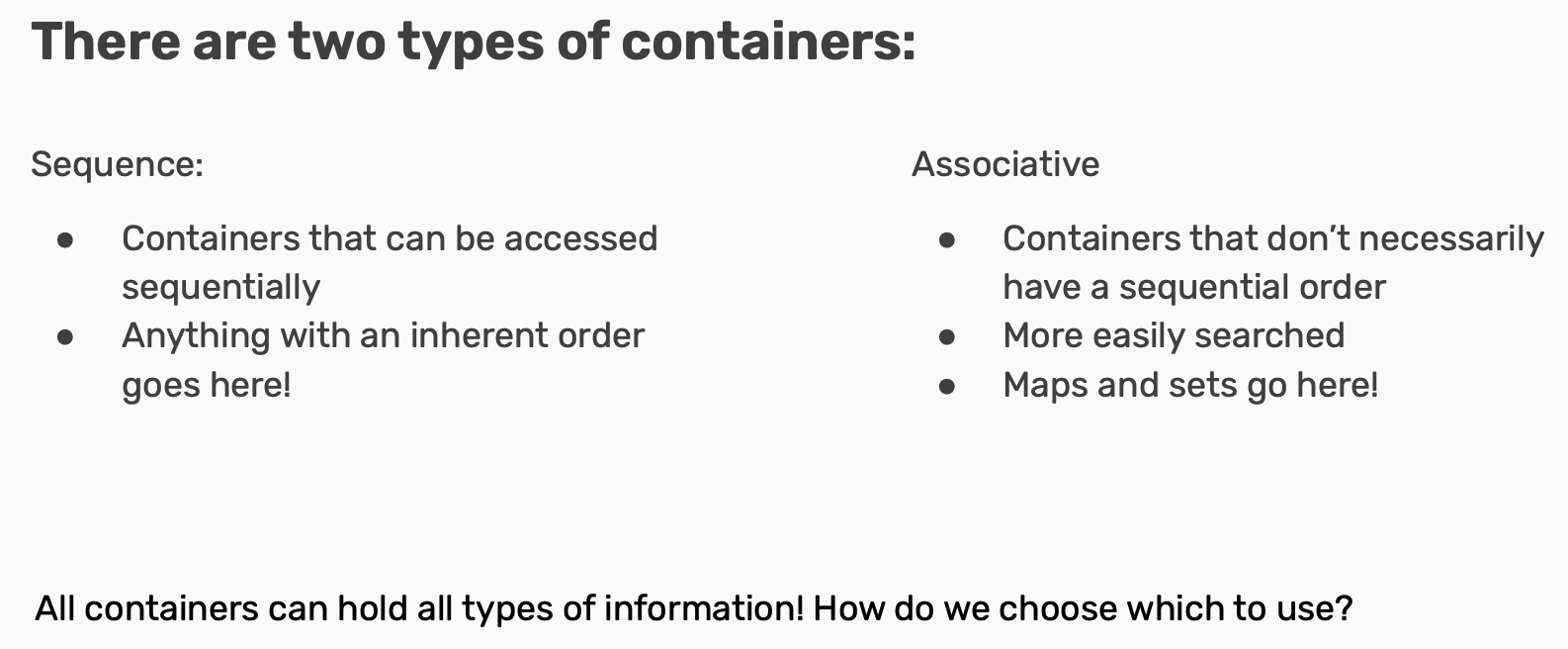
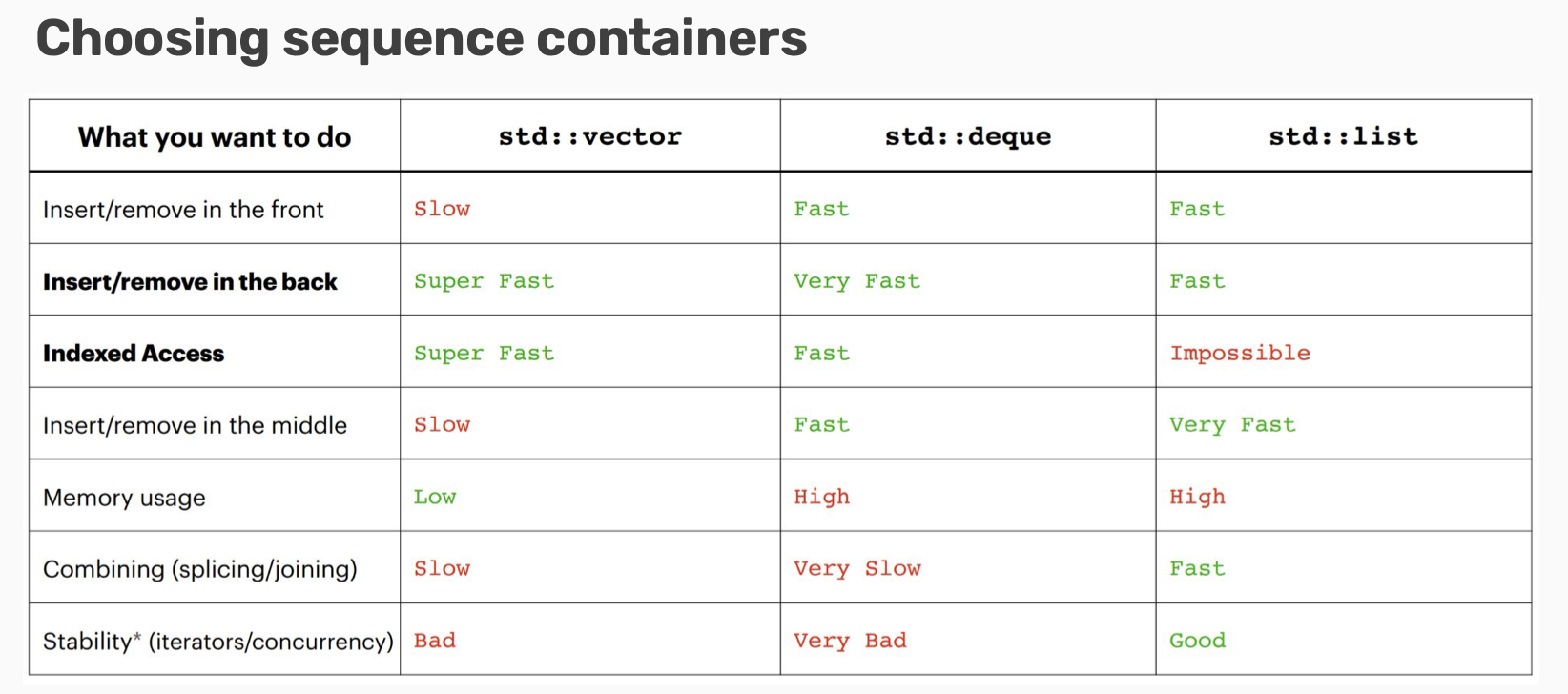
- Sequence containers are for when you need to enforce some order on your information!
- Can usually use an std::vector for most anything
- If you need particularly fast inserts in the front, consider an std::deque
- For joining/working with multiple lists, consider an
std::list (very rarely)
 Map implementation
Maps are implemented with pairs! (std::pair<const key, value>)
Map implementation
Maps are implemented with pairs! (std::pair<const key, value>) - Note the const! Keys must be immutable.
- Why a pair and not a tuple? Unordered maps/sets Both maps and sets in the STL have an unordered version!
- Ordered maps/sets require a comparison operator to be defined.
- Unordered maps/sets require a hash function to be defined.(Simple types are already natively supported; anything else will need to be defined yourself.) Unordered maps/sets are usually faster than ordered ones!
Choosing associative containers Lots of similarities between maps/sets! Broad tips:
- Unordered containers are faster, but can be difficult to get to work with nested containers/collections
- If using complicated data types/unfamiliar with hash functions, use an ordered container
Iterators and Pointers
Introducing Iterators! Containers all implement something called an iterator to do this!
- Iterators let you access all data in containers programmatically!
- An iterator has a certain order; it “knows” what element will come next
- Not necessarily the same each time you iterate!
In the STL All containers implement iterators, but they’re not all the same!
- Each container has its own iterator, which can have different behavior.
- All iterators implement a few shared operations:
- Initializing
iter = s.begin(); - Incrementing++iter;
++iter; - Dereferencing
*iter; - Comparing
iter != s.end(); - Copying
new_iter = iter;
- Initializing
std::map<int> map{{1, 6}, {1, 8}, {0, 3}, {3, 9}};
for (auto iter = map.begin(); iter != map.end(); ++iter){
	const auto& [key, valve] = *iter; // structured binding!
}
Iterators are a particular type of pointer!
- Iterators “point” at particular elements in a container.
- Pointers can “point” at any objects in your code!
- Why is this? All objects stored inside the big container known as memory!
Memory and You Variables created in your code take up space on your computer. They live in memory at specific addresses. Pointers reference those memory addresses and not the object themselves!
Dereferencing Pointers are marked by the asterisk (*) next to the type of the object they’re pointing at when they’re declared. The address of a variable can be accessed by using & before its name, same as when passing by reference! If you want to access the data stored at a pointer’s address, dereference it using an asterisk again.
If we need to access a pointer’s object’s member variables, instead of dereferencing (*ptr) and then accessing (.var), there’s a shorthand!
*ptr.var = ptr->var
Classes
“A struct simply feels like an open pile of bits with very little in the way of encapsulation or functionality. A class feels like a living and responsible member of society with intelligent services, a strong encapsulation barrier, and a well defined interface.” —Bjarne Stroustrup
Classes provide their users with a public interface and separate this from a private implementation
The this keyword!
- Here, we mean “set the Student private member variable name equal to the parameter name”
- this->element_name means “the item in this Student object with name element_name”. Use this for naming conflicts!
Constructors
- Define how the member variables of an object is initialized
- Overloadable
- Use initializer lists for speedier construction BUT WHAT IS AN OBJECT???
- An Object is an instance of a Class.
- When a class is defined, no memory is allocated but when it is instantiated (i.e. an object is created) memory is allocated.
- A class works as a “blueprint” for creating objects Destructors
- deleteing (almost) always happens in the destructor of a class!
- The destructor is defined using Class_name::~Class_name()
- No one ever explicitly calls it! Its called when Class_name object go out of scope!
- Just like all member functions, declare it in the .h and implement in the .cpp!
- Free your memory (
delete [] my_array;)
Template Classes and Const Correctness
Fundamental Theorem of Software Engineering: Any problem can be solved by adding enough layers of indirection. Template Class: A class that is parametrized over some number of types. A class that is comprised of member variables of a general type/types.
// Template Classes You’ve Used
vector<int> numVec; vector<string> strVec;
map<int, string> int2Str; map<int, int> int2Int;

// Writing a Template Class: Syntax
//mypair.h
template<typename First, typename Second>
class MyPair {
public:
	First getFirst();
	Second getSecond();
	void setFirst(First f);
	void setSecond(Second f);
private:
	First first;
	Second second;
};

// Implementing a Template Class: Syntax
// Must announce every member function is templated :/
//mypair.cpp
#include “mypair.h”
template<typename First, typename Second>
First MyPair<First, Second>::getFirst(){
	return first;
}
template<typename Second, typename First>
Second MyPair<First, Second>::getSecond(){
	return second;
}
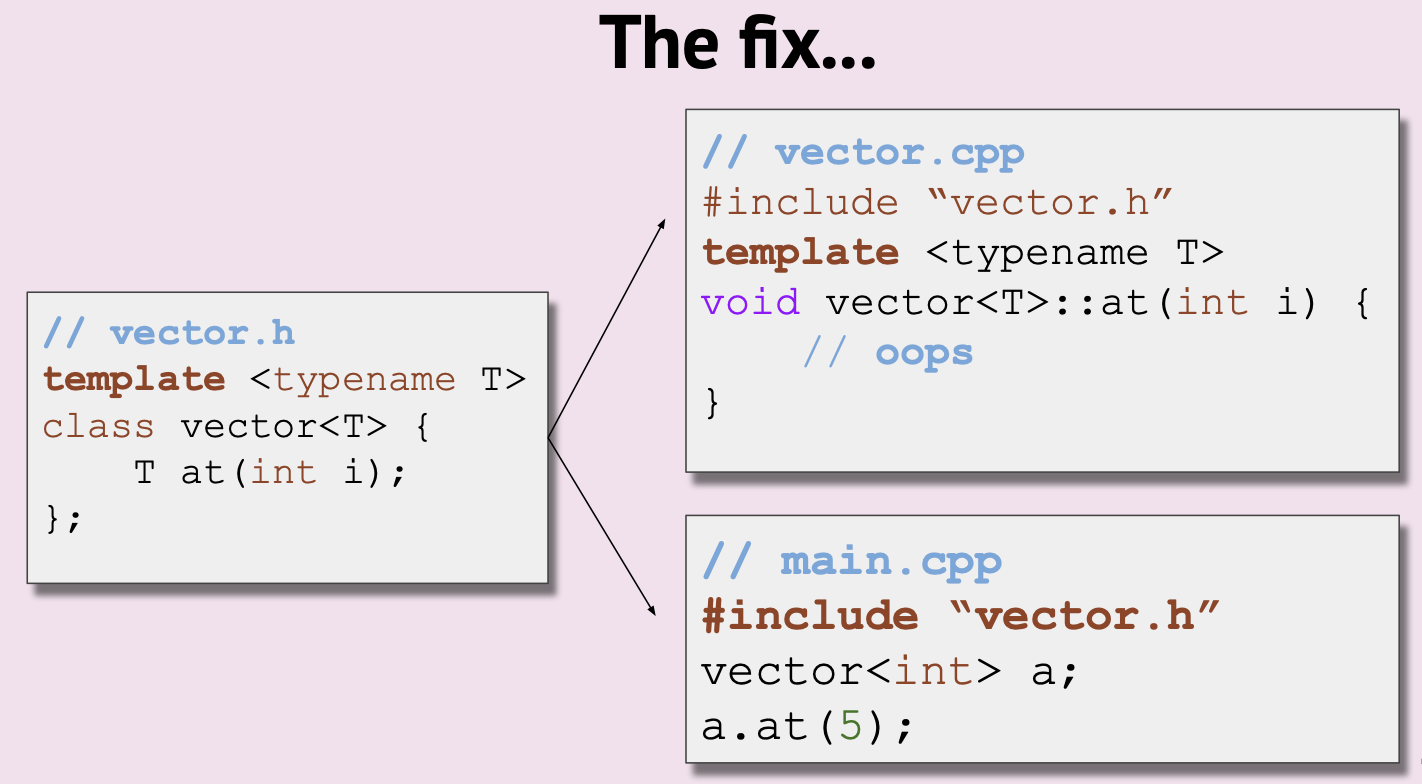
Templates don’t emit code until instantiated, so include the .cpp in the .h instead of the other way around!
Include vector.cpp in vector.h!
Member Types
- Sometimes, we need a name for a type that is dependent on our template types
- Recall: iterators `std::vector
a = {1, 2}; std::vector ::iterator it = a.begin();“ - iterator is a member type of vector
//vector.h
template<typename T> class vector {
public:
   using iterator = T*  // something internal like T*
   iterator begin();
}

//vector.cpp
template <typename T>
typename vector<T>::iterator vector<T>::begin() {...}
const: keyword indicating a variable, function or parameter can’t be modified const indicates a variable can’t be modified! const variables can be references or not! Why const? Find the typo in this code
//student.h
class Student {
public:
	std::string getName() const;
	void setName(string name);
	int getAge() const;
	void setAge(int age);
private:
	std::string name;
	std::string state;
	int age;
};

//student.cpp
#include student.h
std::string Student::getName()const{
	return name;
}
void Student::setName(string name){
    this->name = name;
}
int Student::getAge()const{
	return age;
}
void Student::setAge(int age){
	if(age >= 0){
		this -> age = age;
	}
	else error("No Negative Age!");
}
//main.cpp
std::string stringify(const Student& s){
	return s.getName() + " is " + std::to_string(s.getAge()) + " years old." ;
}
// We need to promise that it doesn’t by defining them as const functions
// Add const to the end of function signatures!
const-interface: All member functions marked const in a class definition. Objects of type const ClassName may only use the const-interface.
- Use const parameters and variables wherever you can in application code
- Every member function of a class that doesn’t change its member variables should be marked const
- auto will drop all const and &, so be sure to specify
- Make iterators and const_iterators for all your classes!
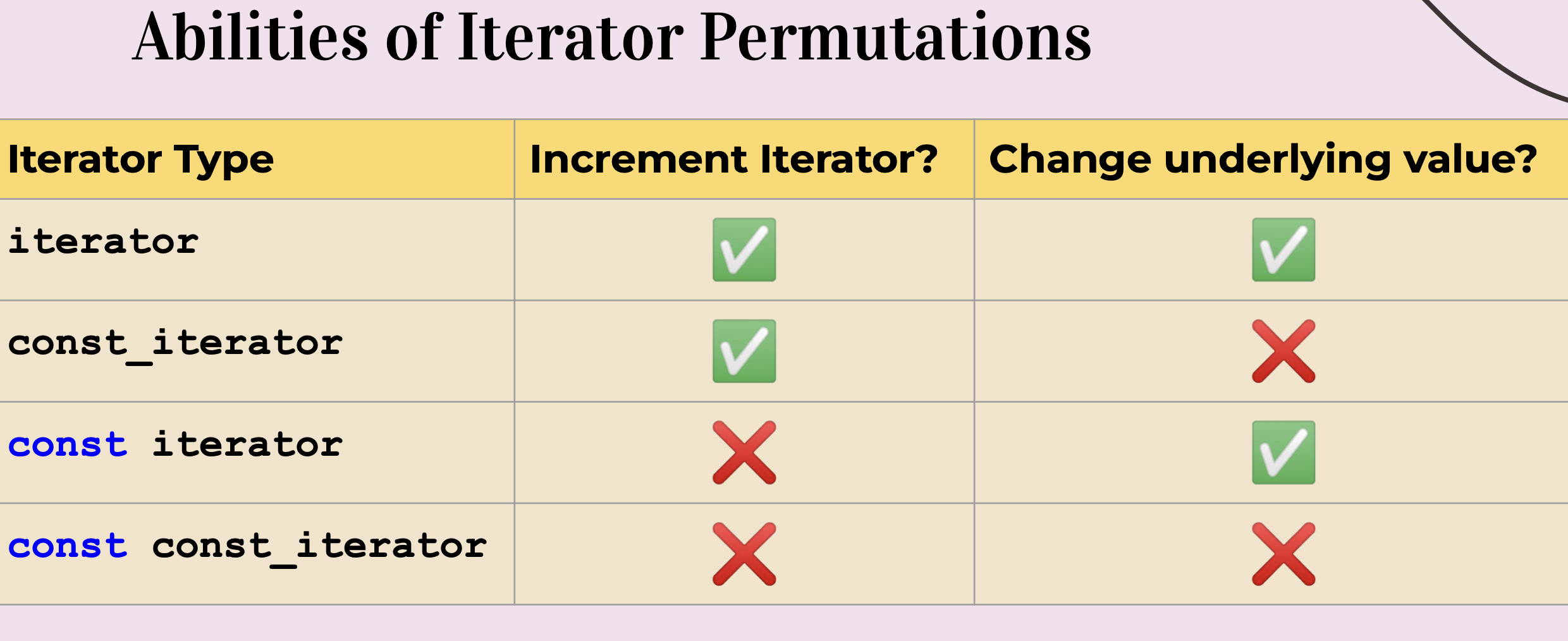
- const iterator = cannot increment the iterator, can dereference and change underlying value
- const_iterator = can increment the iterator, cannot dereference and change underlying value
- const const_iterator = cannot increment iterator, cannot change underlying value
Template Functions
Template functions are completely generic functions! Just like classes, they work regardless of type!
template <typename Type=int> // We can define default parameter types!
Type myMin(Type a, Type b){
	return a < b ? a : b;
}
// We can explicitly define what type we will pass
cout << myMin<int>(3, 4) << endl; // 3
// We can also implicitly leave it for the compiler to deduce!
cout << myMin(3.2, 4) << endl; // 3.2

template <typename T, typename U>
auto smarterMyMin(T a, U b){
	return a < b ? a : b;
}
Behind the Instantiation Scenes
Remember: like in template classes, template functions are not compiled until used!
- For each instantiation with different parameters, the compiler generates a new specific version of your template
- After compilation, it will look like you wrote each version yourself
Template Metaprogramming
Templates can be used for efficiency!
Normally, code runs during runtime.
With template metaprogramming, code runs once during compile time!
template<unsigned n>
struct Factorial {
	enum { value = n * Factorial<n - 1>::value };
};

template<> // template class "specialization"
struct Factorial<0> {
	enum { value = 1 };
};

std::cout << Factorial<10>::value << endl; // prints 3628800, but run during compile time!
Why? Overall, can increase performance for these pieces!
- Compiled code ends up being smaller
- Something runs once during compiling and can be used as many times as you like during runtime TMP was an accident; it was discovered, not invented!
Applications of TMP TMP isn’t used that much, but it has some interesting implications:
- Optimizing matrices/trees/other mathematical structure operations
- Policy-based design
- Game graphics
Functions and Lambdas
This is a successfully templated function! This code will work for any containers with any types, for a single specific target. Will this work for a more general category of targets than one specific value?
template <typename InputIt, typename DataType>
int count_occurrences(InputIt begin, InputIt end, DataType val) {
	int count = 0;
	for (auto iter = begin; iter != end; ++iter) {
		if (*iter == val) count++;
	}
	return count;
}

std::string str = "Xadia";
count_occurrences(str.begin(), str.end(), 'a');
Predicate Functions Any function that returns a boolean value is a predicate!
- isVowel() is an example of a predicate, but there are tons of others we might want!
- A predicate can have any amount of parameters…
template <typename InputIt, typename UniPred>
int count_occurrences(InputIt begin, InputIt end, UniPred pred) {
	int count = 0;
	for (auto iter = begin; iter != end; ++iter) {
		if (pred(*iter)) count++;
	}
	return count;
}

bool isVowel(char c) {
	std::string vowels = "aeiou";
	return vowels.find(c) != std::string::npos;
}

std::string str = "Xadia";
count_occurrences(str.begin(), str.end(), isVowel);
Function Pointers UniPred is what’s called a function pointer!
- Function pointers can be treated just like other pointers
- They can be passed around like variables as parameters or in template functions!
- They can be called like functions!
Poor Generalization
Unary predicates are pretty limited and don’t generalize well.
bool isMoreThan3(int num) { return num > 3; }
Ideally, we’d like something like this!
bool isMoreThan(int num, int limit) { return num > limit; }
We want our function to know more information about our predicate.
However, we can’t pass in more than one parameter.
How can we pass along information without needing another parameter?
Let’s use lambdas!
Lambdas are inline, anonymous functions that can know about functions declared in their same scope!
auto var = [capture-clause] (auto param) -> bool{ }
int limit = 5;
auto isMoreThan = [limit] (int n) { return n > limit; };
isMoreThan(6); // true

// [] captures nothing
// [lower] captures lower by value
// [&lower] captures lower by reference
// [&lower, upper] captures lower by refecen, upper by value
// [&, lower] captures everything except lower by reference
// [&] captures everything by reference
// [=] captures everything by value
Lambdas are pretty computationally cheap and a great tool!
- Use a lambda when you need a short function or to access local variables in your function.
- If you need more logic or overloading, use function pointers.
What the Functor? A functor is any class that provides an implementation of operator().
- They can create closures of “customized” functions!(Closure: a single instantiation of a functor object)
- Lambdas are just a reskin of functors!
class functor {
public:
	int operator() (int arg) const { // parameters and function body
		return num + arg;
	}
private:
	int num; // capture clause
}

int num = 0;
auto lambda = [&num] (int arg) { num += arg; };
lambda(5);
So far, we’ve talked about lambdas, functors, and function pointers. The STL has an overarching, standard function object!
std::function<return_type(param_types)> func;
Everything (lambdas, functors, function pointers) can be cast to a standard function!
Operators
How do operators work with classes?
- Just like declaring functions in a class, we can declare operator functionality!
- When we use that operator with our new object, it performs a custom function or operation!
- Just like in function overloading, if we give it the same name, it will override the operator’s behavior! What can’t be overloaded?
- Scope Resolution
- Ternary
- Member Access
- Pointer-to-member access
- Object size, type, and casting Member functions
- Declare your overloaded operator within the scope of your class!
bool operator < (const Student& rhs) const; - Allows you to use member variables of this-> Non-member functions
- Declare the overloaded operator outside of any classes (main.cpp?)
- Define both left and right hand objects as parameters Non-member overloading is preferred by the STL!
- It allows the LHS to be a non-class type (ex. comparing double to a Fraction)
- Allows us to overload operators with classes we don’t own! (ex. vector to a StudentList)
bool operator< (const Student& lhs, const Student& rhs);
The friend keyword allows non-member functions or classes to access private information in another class!
- To use, declare the name of the function or class as a friend within the target class’s header!
- If it’s a class, you must say
friend class [name];
std::ostream& operator << (std::ostream& out, const Time& time) {
	out << time.hours << ":" << time.minutes << ":" << time.seconds;
	return out;
}
Be careful with non-member overloading! Certain operators, like new and delete, don’t require a specific type.
- Overloading this outside of a class is called global overloading and will affect everything!
void* operator new(size_t size);Rules and Philosophy - Meaning should be obvious when you see it
- Functionality should be reasonably similar to corresponding arithmetic operations
- Don’t define + to mean set subtraction!
- When the meaning isn’t obvious, give it a normal name instead.
Special Member Functions
Classes have three main parts: the constructor and destructor, member variables, and functions. The constructor is called every time a new instance is created, and the destructor is called when it goes out of scope. These are special member functions – every class has them by default!
There are six special member functions! These functions are generated only when they’re called (and before any are explicitly defined by you):
- Default constructor
- Destructor
- Copy constructor
- Copy assignment operator
- Move constructor
- Move assignment operator
class Widget {
public:
	Widget(); // default
	Widget(const Widget& w); // copy constructor
	Widget& operator = (const Widget& w); // copy assignment operator
	~Widget(); // destructor
	Widget(Widget&& rhs); // move constructor
	Widget& operator = (Widget&& rhs); // move assignment operator
}
// We don’t have to write out any of these! They all have default versions that are generated automatically!
Why override special member functions? Sometimes, the default special member functions aren’t sufficient!
- By default, the copy constructor will create copies of each member variable.
- This is member-wise copying!
- But is this always good enough? What about pointers? If your variable is a pointer, a member-wise copy will point to the same allocated data, not a fresh copy!
Copying isn’t always simple! Many times, you will want to create a copy that does more than just copies the member variables.
- Deep copy: an object that is a complete, independent copy of the original In these cases, you’d want to override the default special member functions with your own implementation! Declare them in the header and write their implementation in the .cpp, like any function!
We can delete special member functions! Setting a special member function to delete removes its functionality! Uses We can selectively allow functionality of special member functions!
- This has lots of uses – what if we only want one copy of an instance to be allowed?
- This is how classes like std::unique_ptr work! = default ? We can also keep the default copy constructor if we declare other constructors!(Declaring any user-defined constructor will make the default disappear without this!)
class PasswordManager {
public:
	PasswordManager();
	PasswordManager(const PasswordManager& pm) = default;
	// other methods ...
	~PasswordManager();
	PasswordManager(const PasswordManager& rhs) = delete;
	PasswordManager& operator = (const PasswordManager& rhs) = delete;

private:
	// other important member ...
}
The Rule of 0 If the default SMFs work, don’t define your own! We should only define new ones when the default ones generated by the compiler won’t work.
- This usually happens when we work with dynamically allocated memory, like pointers to things on the heap! The Rule of 3 If you have to define a destructor, copy constructor, or copy assignment operator, you should define all three!
- Needing one signifies you’re handling certain resources manually.
- We then should handle the creation, assignment, use, and destruction of those resources ourselves! Is copying enough? We’ve learned about the default constructor, destructor, and the copy constructor and assignment operator.
- We can create an object, get rid of it, and copy its values to another object!
- Is this ever insufficient? The copy constructor will copy every value in the values map one by one! Very slowly! Move operations
- Move constructors and move assignment operators will perform “memberwise moves.”
- Defining a move assignment operator prevents generation of a move copy constructor, and vice versa.
- If the move assignment operator needs to be re-implemented, there’d likely be a problem with the move constructor! Caveats Move constructors and operators are only generated if:
- No copy operations are declared
- No move operations are declared
- No destructor is declared Declaring any of these will get rid of the default C++ generated operations. If we want to explicitly support move operations, we can set the operators to default:
Widget(Widget&&) = default;
Widget& operator=(Widget&&) = default; // support moving

Widget(const Widget&) = default;
Widget& operator=(const Widget&) = default; // support copying
Move Semantic
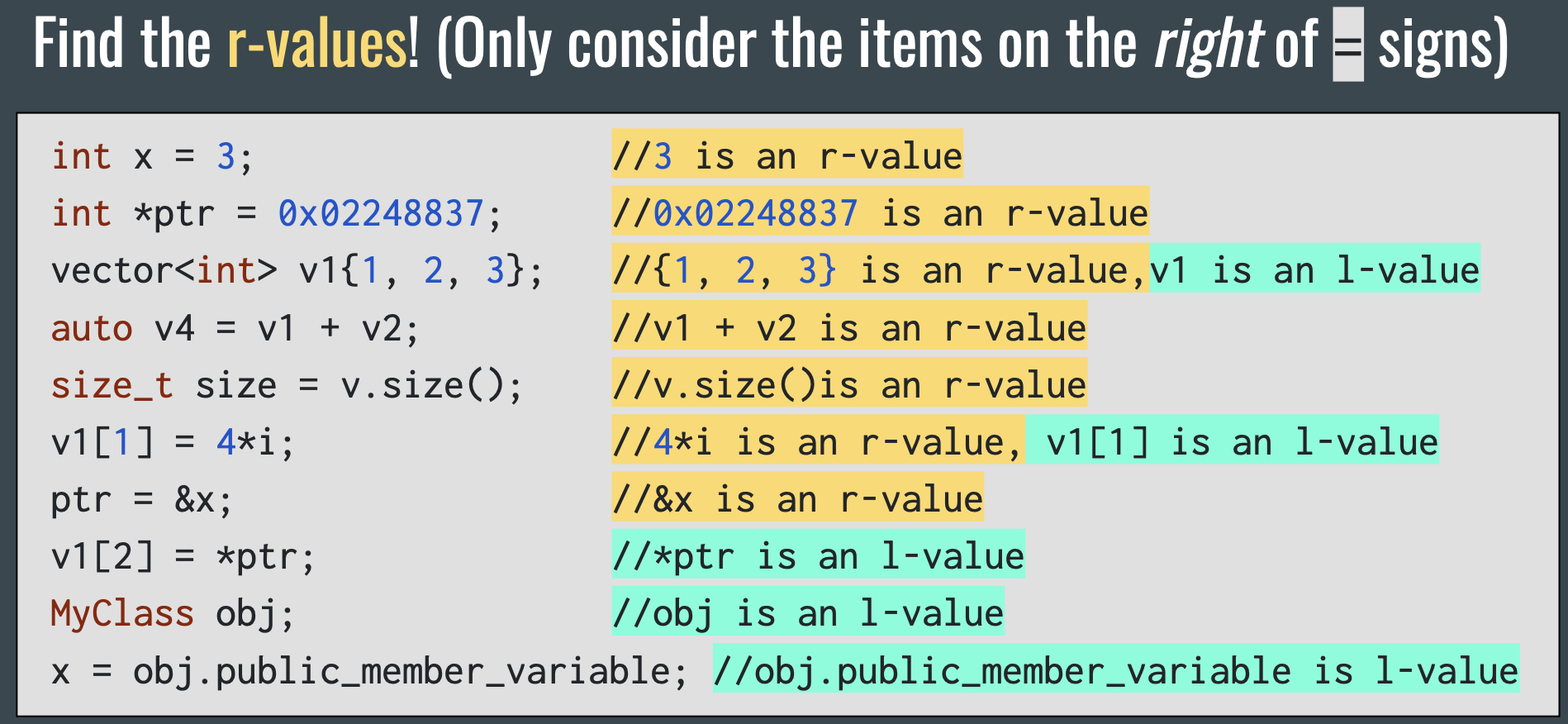
l-values live until the end of the scope; r-values live until the end of the line
 The Central Problem
vector<int> make_me_a_vec(int num) {
     vector<int> res;
     while (num != 0) {
         res.push_back(num%10);
         num /= 10;
	}
	return res;
}
nums2 = make_me_a_vec(23456);
We need to find a way to move the result of make_me_a_vec to nums2, so that we don’t create two objects (and immediately destroy one) Question: Why don’t we just return vector& instead of vector in make_me_a_vec?
Only l-values can be referenced using &
int main() {
    vector<int> vec;
    change(vec);
}
void change(vector<int>& v){...}
//v is a reference to vec

int main() {
    change(7);
    //this will compile error
}
//we cannot take a reference to
//a literal!
void change(int& v){...}

// Vector Copy Assignment Operator
template <typename T>
vector<T>& vector<T>::operator=(const vector<T>& other) {
    if (&other == this) return *this;
    _size = other._size;
    _capacity = other._capacity;
    delete[] _elems;
    _elems = new T[other._capacity];
    std::copy(other._elems, other._elems + other._size, _elems);
    return *this;
}
// std::copy is a generic copy function used to copy a range of elements from one container to another.
rvalues can be bound to const & (we promise not to change them) passing by & avoids making unnecessary copies… but does it? How many arrays will be allocated, copied and destroyed here?
int main() {
    vector<int> vec;
    vec = make_me_a_vec(123); //make_me_a_vec(123) is an r-value
}- vec is created using the default constructor
- make_me_a_vec creates a vector using the default constructor and returns it
- vec is reassigned to a copy of that return value using copy assignment
- copy assignment creates a new array and copies the contents of the old one
- The original return value’s lifetime ends and it calls its destructor
- vec’s lifetime ends and it calls its destructor
How do we know when to use move assignment and when to use copy assignment? When the item on the right of the = is an r-value we should use move assignment Why? r-values are always about to die, so we can steal their resources
How to make two different assignment operators? Overload vector::operator= ! How? Introducing… the r-value reference &&
// Overloading with &&
int main() {
    int x = 1;
    change(x); //this will call version 2
    change(7); //this will call version 1
}

void change(int&& num){...} //version 1 takes r-values
void change(int& num){...} //version 2 takes l-values //num is a reference to vec

// move assignment
vector<T>& operator=(vector<T>&& other) {
     if (&other == this) return *this;
     _size = other._size;
     _capacity = other._capacity;

	//we can steal the array
	delete[] _elems;
	_elems = other._elems;
	return *this;
}
int main() {
    vector<int> vec;
    vec = make_me_a_vec(123); //this will use move assignment
    vector<string> vec1 = {“hello”, “world”}
    vector<string> vec2 = vec1; //this will use copy assignment
    vec1.push_back(“Sure hope vec2 doesn’t see this!”)
}
// The compiler will pick which vector::operator= to use based on whether the RHS is an l-value or an r-value
Introducing… std::move
- std::move(x) doesn’t do anything except cast x as an r-value
- It is a way to force C++ to choose the && version of a function
vector<T>& operator=(vector<T>&& other)
{
     if (&other == this) return *this;
     _size = std::move(other._size);
     _capacity = std::move(other._capacity);

	//we can steal the array
	delete[] _elems;
	_elems = std::move(other._elems);
	return *this;
}

// copy constructor
vector<T>(const vector<T>& other) {
     if (&other == this) return *this;
     _size = other._size;
     _capacity = other._capacity;
	//must copy entire array
	delete[] _elems;
	_elems = new T[other._capacity];
	std::copy(other._elems, other._elems + other._size, _elems);
	return *this;
}
// move constructor
vector<T>(vector<T>&& other) {
     if (&other == this) return *this;
     _size = std::move(other._size);
     _capacity = std::move(other._capacity);
	//we can steal the array delete[] _elems;
	_elems = std::move(other._elems);
	return *this;
}
Where else should we use std::move? Rule of Thumb: Wherever we take in a const & parameter in a class member function and assign it to something else in our function Don’t use std::move outside of class definitions, never use it in application code!
// Copy push_back
void push_back(const T& element) {
    elems[_size++] = element;
    //this is copy assignment
}
// Move push_back
void push_back(T&& element) {
    elems[_size++] = std::move(element);
    //this forces T’s move assignment
}
The 6 Special Member Functions
- Default constructor: A constructor that takes no arguments and initializes an object to a default state. If a class has dynamically allocated resources, the default constructor should initialize them to a valid state.
- Copy constructor: A constructor that creates a new object by copying an existing object of the same type. This function is called when an object is passed by value or returned by value.
- Move constructor: A constructor that creates a new object by moving the resources of an existing object of the same type. This function is called when an object is moved, typically as an rvalue reference.
- Copy assignment operator: An overloaded assignment operator that assigns the contents of one object to another object of the same type. This function is called when an object is assigned to another object of the same type.
- Move assignment operator: An overloaded assignment operator that moves the resources of one object to another object of the same type. This function is called when an object is moved, typically as an rvalue reference.
- Destructor: A special member function that is called when an object is destroyed, typically when it goes out of scope or is deleted. This function is responsible for freeing any dynamically allocated resources that the object owns.
std::optional and Type Safety
In programming, if you still need to use an object after “giving” it to another part of the program, you would make a copy so that you can keep using the original TLDR: Move Semantics
- Move semantics is a way to make copying things faster and more efficient
- Using move semantics tells the program “you can use this now, I don’t need it anymore”
- If your class has copy constructor and copy assignment defined, you should also define a move constructor and move assignment
- Define these by overloading your copy constructor and assignment to be defined for Type&& other as well as Type& other
- Use std::move to force the use of other types’ move assignments and constructors
- All std::move(x) does is cast x as an rvalue
- Be wary of std::move(x) in main function code!
const-interface : All member functions marked const in a class definition. Objects of type const ClassName may only use the const-interface. Key Idea: Sometimes less functionality is better functionality
- Technically, adding a const-interface only limits what RealVector objects marked const can do
- Using types to enforce assumptions we make about function calls help us prevent programmer errors
Type Safety: The extent to which a language guarantees the behavior of programs.
valueType& vector<valueType>::back(){
  if(empty()) throw std::out_of_range;
  return *(begin() + size() - 1);
}
Type Safety: The extent to which a function signature guarantees the behavior of a function.
std::pair<bool, valueType&> vector<valueType>::back(){
   if(empty()){
      return {false, valueType()};
   }
   return {true, *(begin() + size() - 1)};
}
// valueType may not have a default constructor
// Even if it does, calling constructors is expensive
What is std::optional<T>?
std::optional is a template class which will either contain a value of type T or contain nothing (expressed as nullopt)
(Nullptr: an object that can be converted to a value of any pointer type; Nullopt: an object that can be converted to a value of any optional type)
// What if back() returned an optional?
std::optional<valueType> vector<valueType>::back(){
   if(empty()){
	return {}; }
   return *(begin() + size() - 1);
}
std::optional interface
- .value()
- returns the contained value or throws bad_optional_access error
- .value_or(valueType val)
- returns the contained value or default value, parameter val
- .has_value()
- returns true if contained value exists, false otherwise
std::optional<Student> lookupStudent(string name){//something}
std::optional<Student> output = lookupStudent(“Keith”);
if(output.has_value()){ // output (Evaluate optionals for a value like bools!)
   cout << output.value().name << “ is from “ <<
	    output.value().state << endl;
} else {cout << “No student found” << endl; }

void removeOddsFromEnd(vector<int>& vec){
   while(vec.back() && vec.back().value() % 2 == 1){
       vec.pop_back();
   }
}
Is this…good? Pros of using std::optional returns:
-
Function signatures create more informative contracts
-
Class function calls have guaranteed and usable behavior Cons:
-
You will need to use .value() EVERYWHERE
-
(In cpp) It’s still possible to do a bad_optional_access
-
(In cpp) optionals can have undefined behavior too (*optional does same thing as .value() with no error checking)
-
In a lot of cases we want
std::optional<T&>…which we don’t have -
You can guarantee the behavior of your programs by using a strict type system!
-
std::optional is a tool that could make this happen: you can return either a value or nothing: .has_value() , .value_or() , .value()
-
This can be unwieldy and slow, so cpp doesn’t use optionals in most stl data structures
-
Many languages, however, do!
-
The ball is in your court!
-
Besides using them in classes, you can use them in application code where it makes sense! This is highly encouraged :)
RAII, Smart Pointers and Building C++ Projects
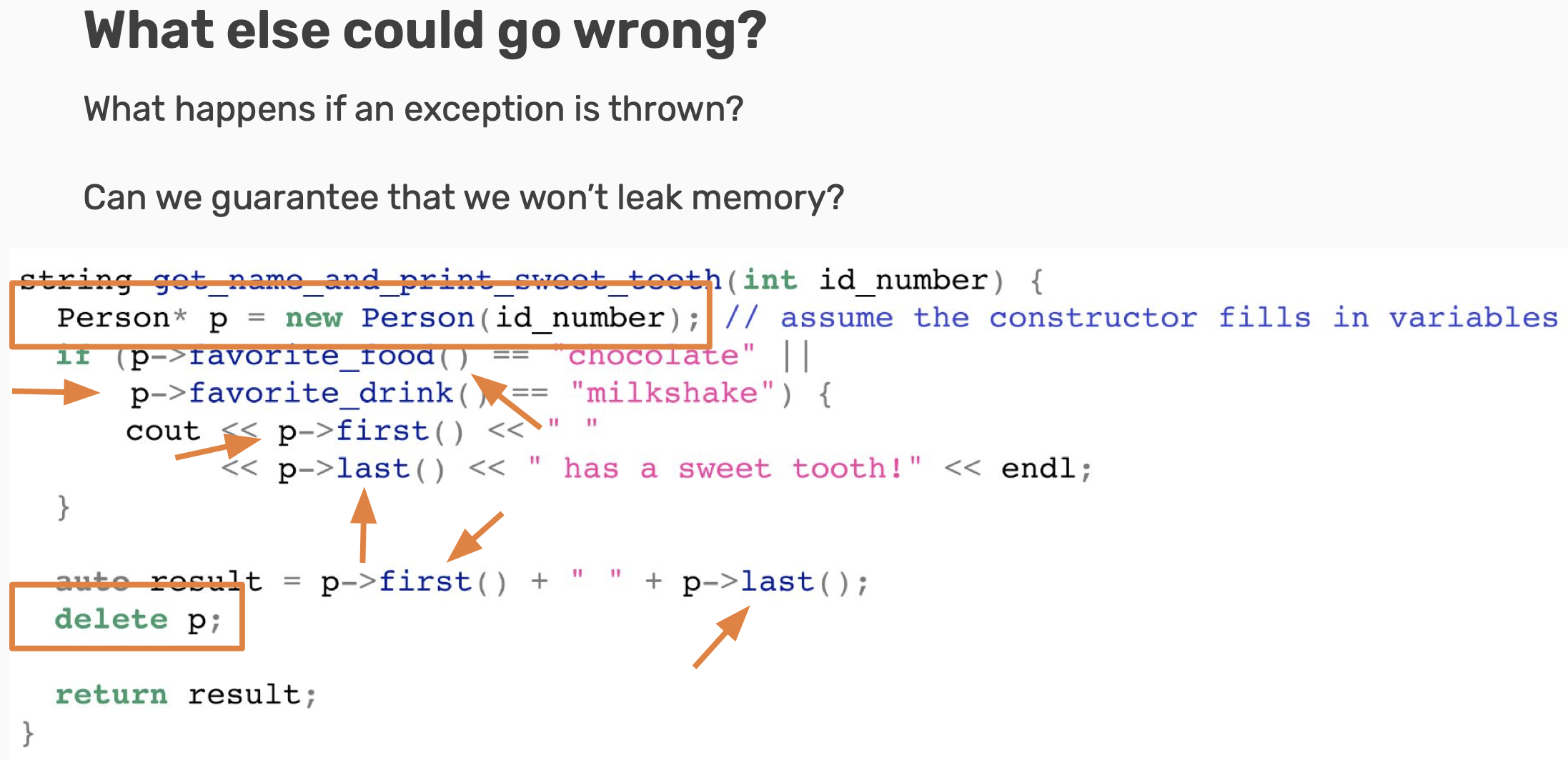
Now entering: exceptions! When a function has an error, it can crash the program.
- This is known as “throwing” an exception. However, we can write code to handle these to let us continue!
- This is “catching” the exception!
try {
      // code that we check for exceptions
}
catch([exception type] e1) { // "if"
      // behavior when we encounter an error
}
catch([other exception type] e2) { // "else if"
	// ...
}
catch { // the "else" statement
	// catch-all (haha)
}
There are often more code paths than meet the eye!
- Make sure to cover all possible paths in test cases for production code.
- Or, catch any errors that could create other potential paths!
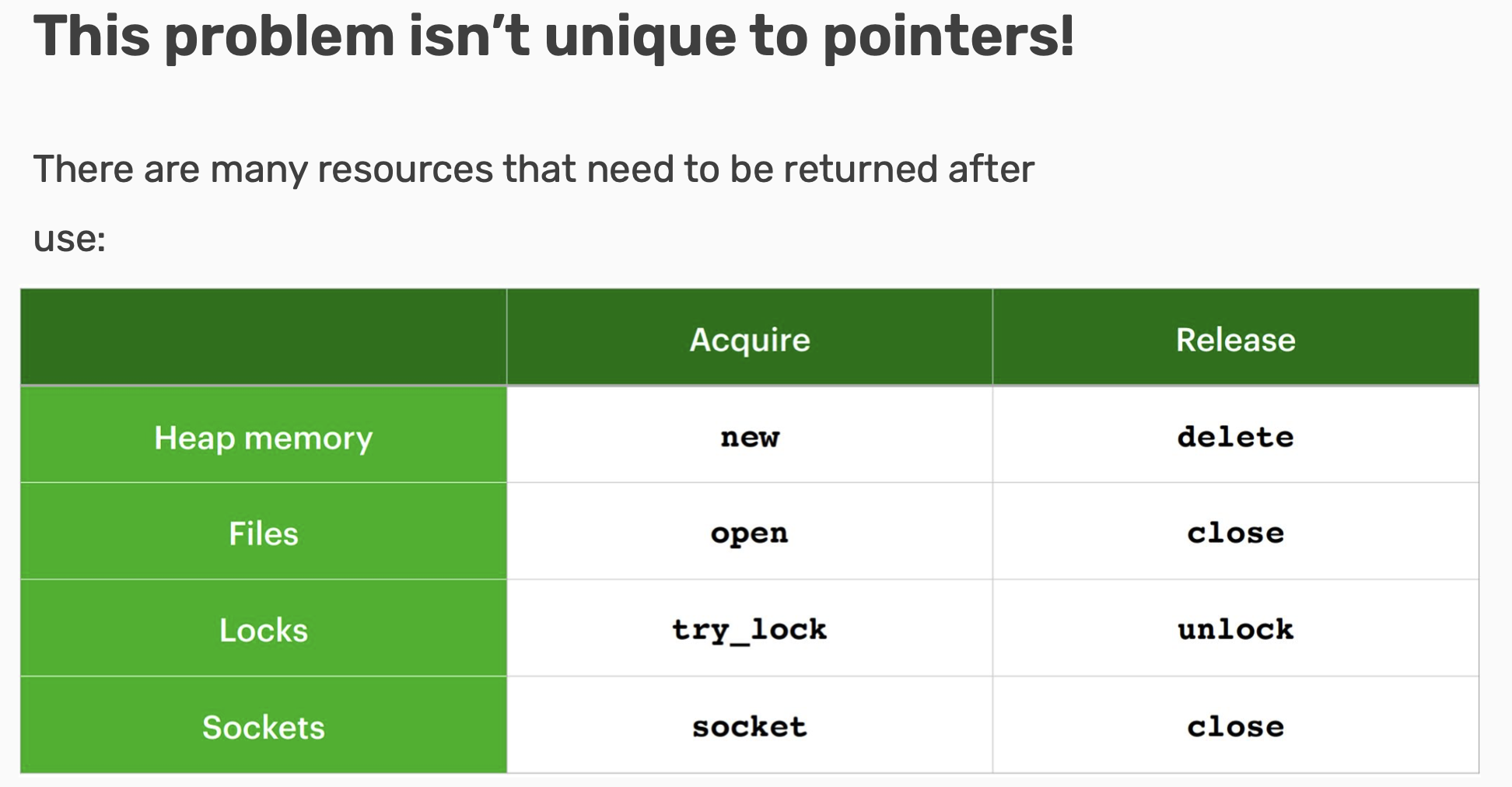
RAII: Resource Acquisition is Initialization RAII is a concept developed by our good friend Bjarne and a driving philosophy behind C++, Java, and other languages. In RAII:
- All resources used by a class should be acquired in the constructor
- All resources used by a class should be released in the destructor
Why RAII? Why care about this?
- Objects should be usable immediately after creation.
- There should never be a “half-valid” state of an object, where it exists in memory but is not accessible to/used by the program.
- The destructor is always called (when the object goes
out of scope), so the resource is always freed!
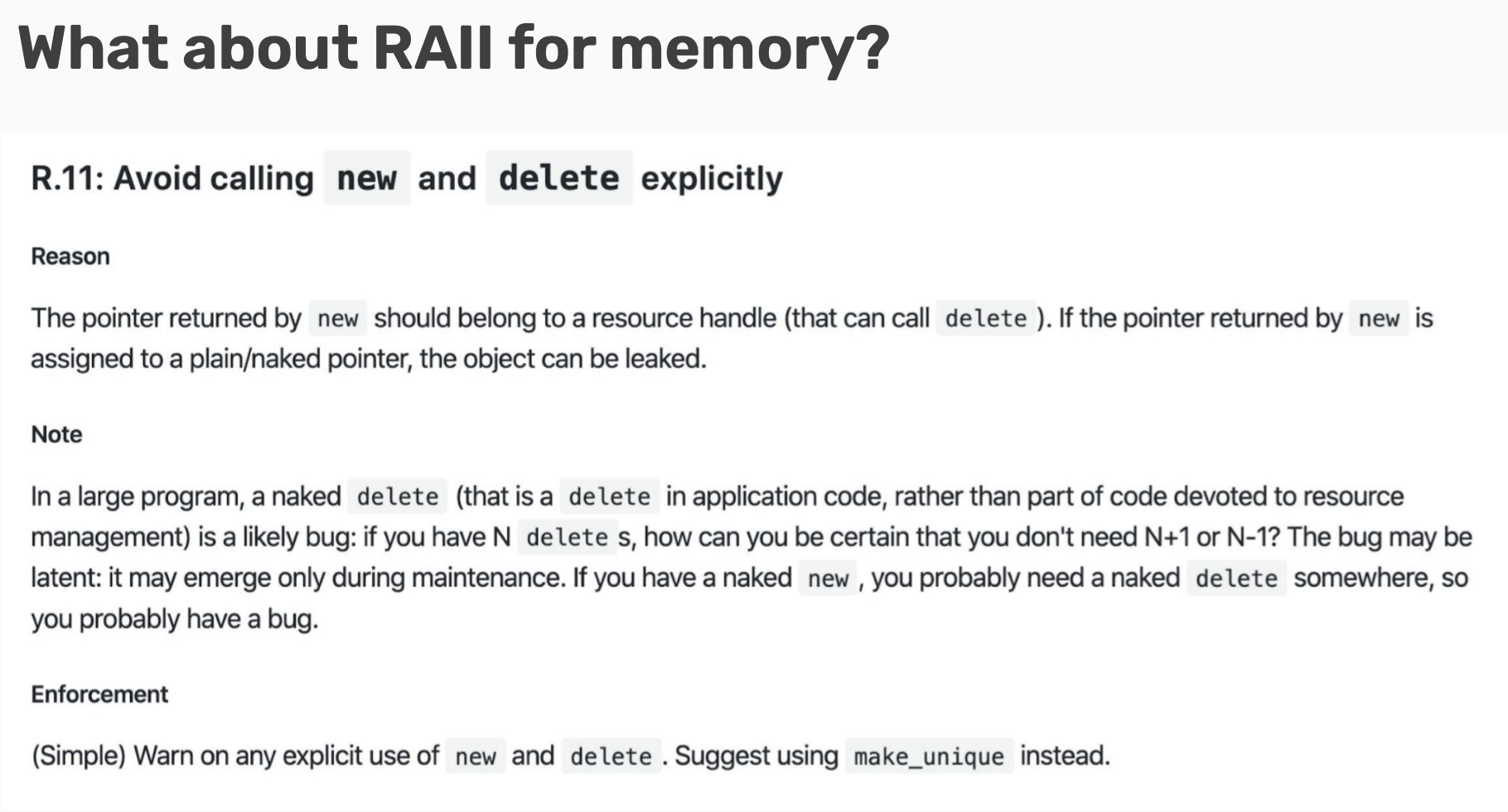
We fixed mutexes by creating a new object that acquires the resource in the constructor and releases it in the destructor. We can do the same thing for memory!
- These wrapper pointers are called “smart pointers.”
There are three types of smart (RAII-safe) pointers:
- std::unique_ptr
- Uniquely owns its resource, can’t be copied
- std::shared_ptr
- Can make copies, destructed when underlying memory goes out of scope
- std::weak_ptr
- Models temporary ownership: when an object only needs to be accessed if it exists (convert to shared_ptr to access)
Why can’t we copy unique_ptr? When a unique_ptr goes out of scope, it frees the memory associated with it. What if we had a unique_ptr, copied it, then the original destructor was called? The copy would be pointing at deallocated memory! shared_ptr gets around this for us by only deallocating memory when all of the shared_ptrs have gone out of scope.
std::unique_ptr<T> up{new T};
std::unique_ptr<T> up = std::make_unique<T>();

std::shared_ptr<T> up{new T};
std::shared_ptr<T> up = std::make_shared<T>();

std::weak_ptr<T> wp = sp;
// can only be copy/move constructed (or empty)!
Which is better?
Always use std::make_unique<T> and std::make_shared<T>!
- If we don’t use make_shared, then we’re allocating memory twice (once for sp, and once for new T)!
- We should be consistent across smart pointers – if we use make_shared, also use make_unique!
What do make and Makefiles do?
- make is a “build system”
- Uses g++ as its main engine
- Several stages to the compiler system
- Can be utilized through a Makefile!
- Let’s take a look at a simple makefile to get some practice!
So then what is cmake? If we have Makefiles already, why use cmake?
- cmake is a cross-platform make!
- make is a build system, and cmake creates entire build systems!
- Another level of abstraction that takes in an even higher-level config file, ties in external libraries, and outputs a Makefile, which is then run.